
Note : This is an add-on to the ERP. So it won't be available by default. If you want to use this add-on, knock us, we will activate it for your company.

Once its ready you can able to see a new menu under Sales Settings.You can go there by Sales -> Settings -> Shipping Cost. Here you can see the options to add, edit, delete, and update the costs as per your needs.
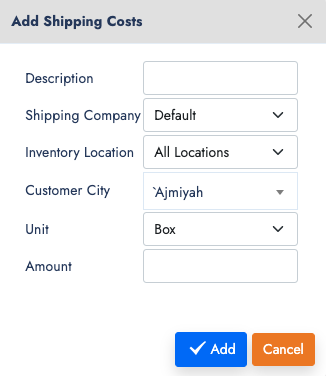
Before getting into the entries, let's understand the Method here it works. We have
- the customer city from customers profile.
- Shipping companies
- Our inventory locations
- Items unit such as Kg. Gram, litre, etc
After all, we have to price it for that range. With that the shipping cost will be calculated and applied in the sales invoice. Once you add the shipping cost list with locations. Now, let's try make one sales invoice and bring the shipping cost into it.
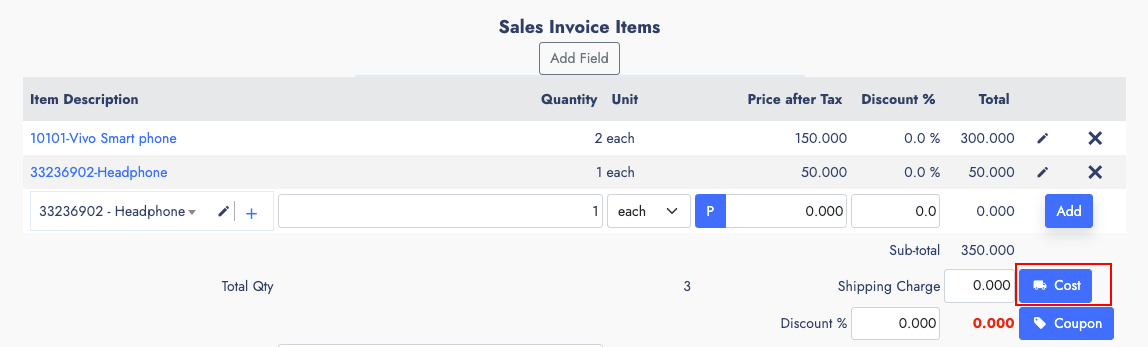
Goto Sales ->New -> Direct Invoice. Now choose a customer who has the city input. And also update our deliver from location. Than the Shipper from the drop down, the shipping companies drop down comes after the line items. and for cash sales term.
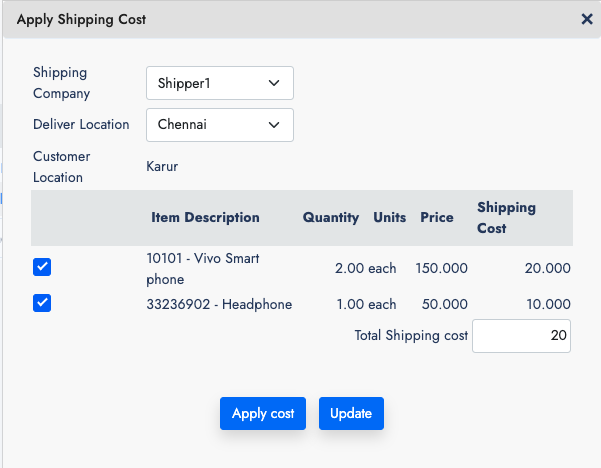
After that you have to add some items in the line to test it. Now click on the button next to Shipping cost text box. It will open a popup window. within it use the checkboxes to mark the items that you want to apply shipping cost and the calculated cost will show here. If you wish to modify manually change it and press Apply cost. The popup close and the shipping cost will be updated in the form. if there is any tax associated, which will also get calculated here.
That's the simple procedure to use the shipping cost on your sales transactions.
That's the simple procedure to use the shipping cost on your sales transactions.