How to Configure VAN Sales With TamilAccounting

TamilAccounting configure to perform VAN Sales and VAN Branch Sales configured to work on it. Lets see the steps to perform how to make the VAN Sales with it.

VVaradha
Varadha
Aug 18, 2022 · 2 min read
How to Configure VAN Sales With TamilAccounting
Now a days, VAN sales is one a best to reach more customers on their location. The Stock has to be loaded on the VAN travel to customers location. So we have to have separate location for each VAN. Lets do this on a step by step process. 
  1. Create Inventory/Warehouse Location for VAN.
  2. New Point of Sale for VAN sales and connect with Right Inventory location that we created to connect the VAN POS.
  3. We have to create Separate Cash Account and Bank account(if needed) to collect the money in separate account.

  4. Let's create separate User Account for VAN Salesman.
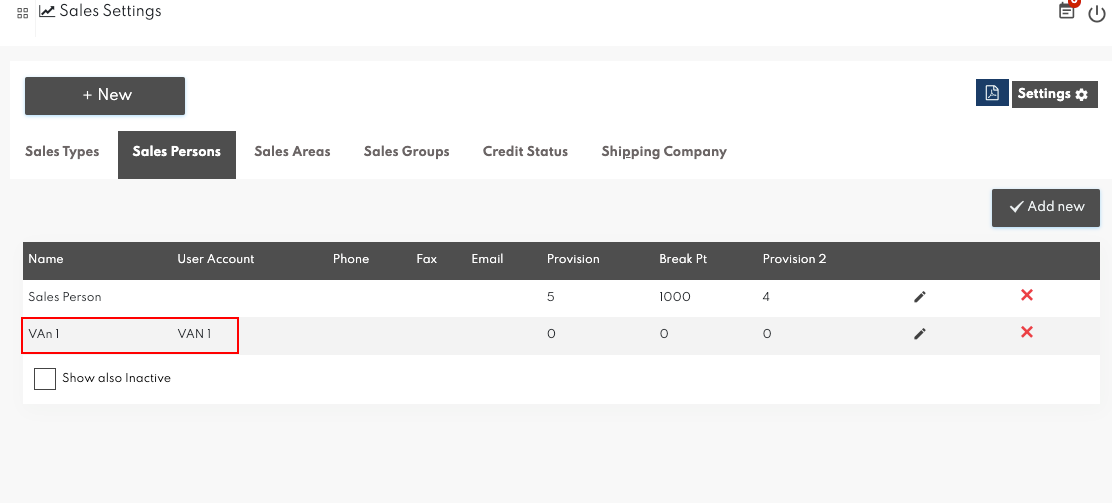
  5. And also we have to create Salesman for the VAN User. So we can connect the Salesman, User account and POS. And we already connected the POS with location.  
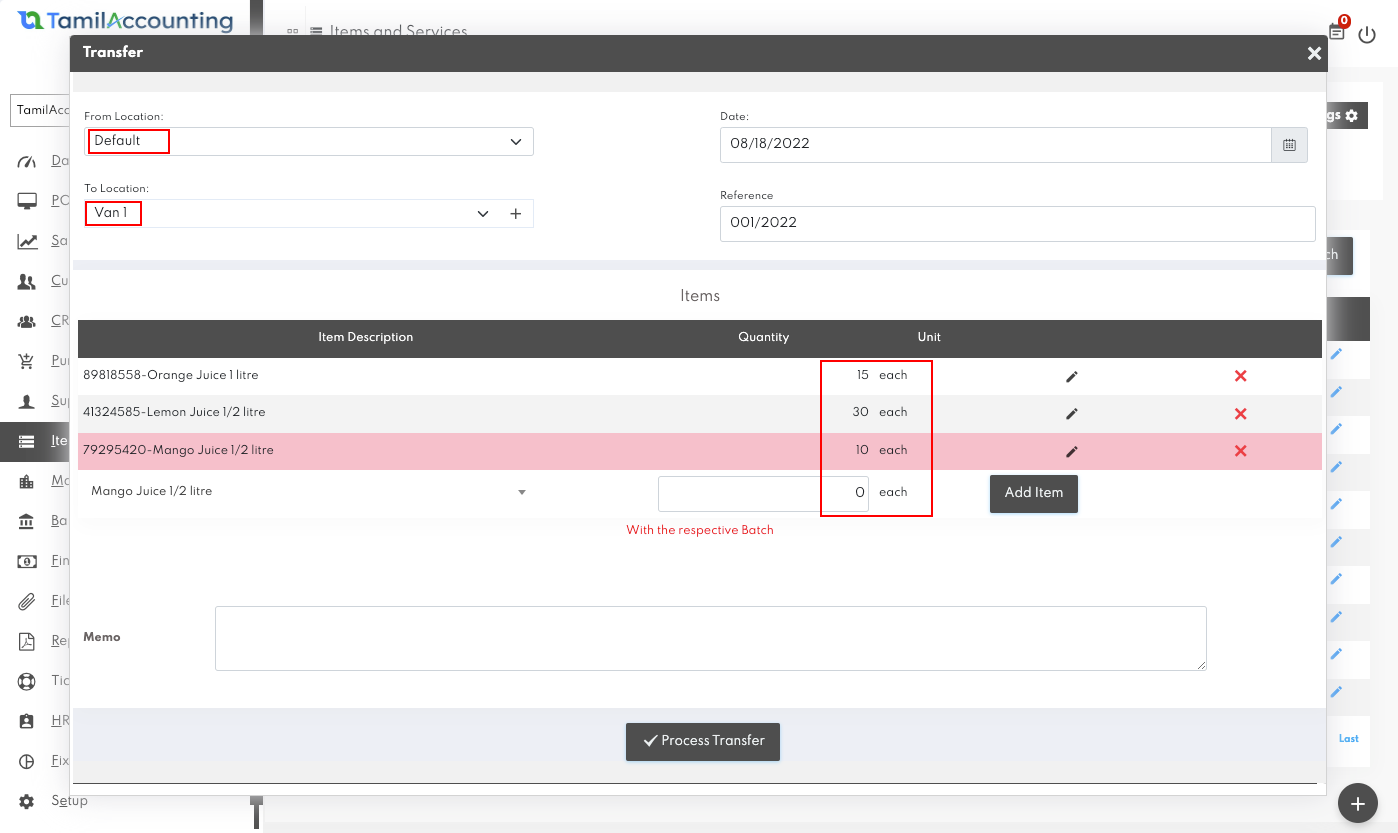
  6. Let's move the stock from Warehouse to VAN and from their we can allow them to perform the transaction. 
  7. That's it from the configuration of ERP admin. 
  8. Now, lets login as VAN User and check the stocks on his location. As of now, we have not limited with Location. so the user can change the location. So it's better You can give them only on the POS page, From their they can able to perform sales only with existing stocks. 
Now you can check the stocks and let them to start make sales through the VAN.  If you have any doubts regarding the configurations you can knock us. 
Share this article
VVaradha
Written by

Varadha

Founder & CEO of TA Book. A full-stack technologist from Karur, Tamil Nadu — building cloud-native, multi-country ERP for the next decade. 9+ years across GST, VAT, ZATCA, FTA and white-label reseller systems.

Try It Yourself

Run your entire business on one ERP.

Sales, purchases, inventory, manufacturing, HR & payroll, banking, tax filings — already linked. Free trial, no credit card.

Start Free Trial
Global Coverage

Multi-Country ERP — One Platform

Supports GST (India), VAT (UAE, South Africa, Egypt, Iraq, Botswana), and local compliance across all regions.

🇮🇳 India (GST)
🇦🇪 UAE (VAT)
🇸🇦 Saudi Arabia
🇶🇦 Qatar
🇧🇭 Bahrain
🇴🇲 Oman
🇰🇼 Kuwait
🇪🇬 Egypt
🇮🇶 Iraq
🇿🇦 South Africa
🇧🇼 Botswana
🇲🇾 Malaysia
🇸🇬 Singapore
🇦🇺 Australia
🇬🇧 United Kingdom
🇺🇸 USA
🌏 & More Regions